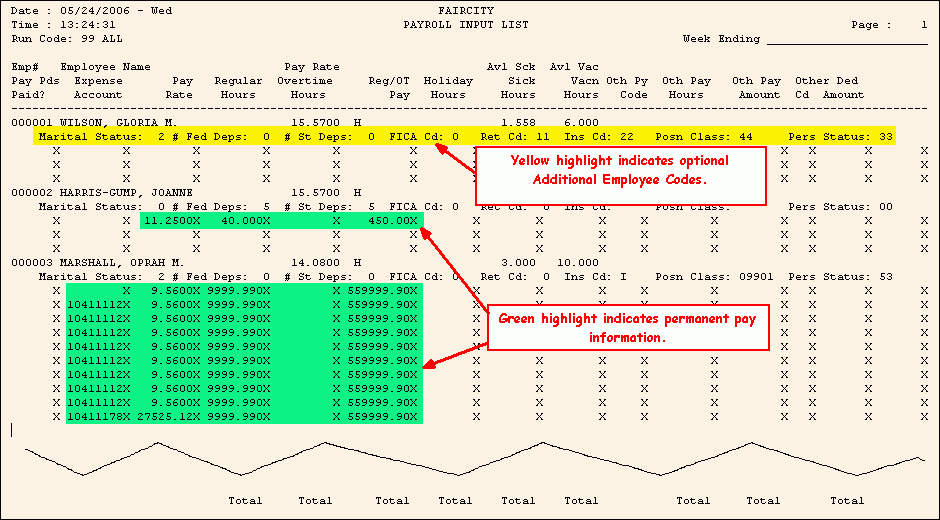
Payroll Input List Sample
Tips:
To see instructions for running the report shown below, see the Payroll Input List Instructions.
To see descriptions of the report fields, click More.
|
Payroll Input List Report Fields Tip: To see more information about a field, click the hyperlink for the field name. | |
|
Heading | |
|
Run Code | |
|
Employee Line 1 | |
|
Employee Number | |
|
Employee Name |
|
|
Pay Rate |
Employee Hourly Rate or Employee Salary Rate based up the Employee Pay Calculation Code |
|
Sick Time Available | |
|
Vacation Time Available | |
|
Employee Line 2 Tip: This line prints only if you specified to print additional employee codes. | |
|
Employee Marital Status Code Tip: The Marital Status Codes vary among states. | |
|
Employee Number of Federal Dependents | |
|
Employee Number of State Dependents | |
|
Employee FICA Code | |
|
Retirement Code | |
|
MSR Life Insurance Code | |
|
MSR Position Classification Code | |
|
MSR Personnel Status Code | |
|
Employee Lines 3 through 6 Notes: The report prints three lines with XXXs to delineate areas for you to fill in. If the employee has permanent pay data, the information is filled in for you. | |
|
Period End Date | |
|
Department Number | |
|
Pay Rate |
Employee Hourly Rate or Employee Salary Rate based upon the Employee Pay Calculation Code |
|
Regular Time | |
|
Overtime Time | |
|
Regular / Overtime Pay | |
|
Holiday Hours |
Holiday Hours Tip: Holiday hours are identified by the Other Pay Type for the related Other Pay Code. |
|
Sick Hours |
Sick Time Tip: Sick hours are identified by the Other Pay Type for the related Other Pay Code. |
|
Vacn Hours |
Vacation Time Tip: Vacation hours are identified by the Other Pay Type for the related Other Pay Code. |
|
Other Pay Code | |
|
Other Pay Time | |
|
Other Pay Amount | |
|
Deduction Code | |
|
Deduction Amount - Other | |
|
Selection Parameters for this Report Sample: |
|
|
Run Code = 3 - All Run Codes |
Report Type = 3 - All |
|
Print Additional Employee Codes = Yes |
Page Width = 132 Columns |
