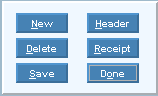
Group Mortgage Payment Entry - Button Bar Area
The table following the window example describes the Button Bar Area for Group Mortgage Payment Entry.
Example:
|
Button Bar Area Prompts |
|
|
|
To add a new transaction to the Detail Area, click New or press [ENTER] if the button is in focus. Keyboard shortcut: [ALT + n] |
|
|
To change the information in the Header Detail Area, click Header or press [ENTER] if the button is in focus. Keyboard shortcut: [ALT + h] Tip: You must first display the payment. Run the Group Mortgage Payment Journal to find pending payments. |
|
|
To delete a transaction, click the transaction so it is highlighted, and then click Delete, or press [ENTER] if the button is in focus. Keyboard shortcut: [ALT + d] Note: If you delete all of the transactions for a Group Mortgage Payment, the payment will not be posted. |
|
|
To print a Group Mortgage Payment Receipt or the Check Validation, click Receipt or press [ENTER] if the button is in focus. Focus then moves to the Print Receipt Area. Keyboard shortcut: [ALT + r] |
|
|
To Save new or changed transactions, click Save or press [ENTER] if the button is in focus. Keyboard shortcut: [ALT + s] |
|
To avoid losing data, you must save new or changed transactions. | |
|
|
To clear the window for entering the next Group Mortgage Payment, click Done or press [ENTER] if the button is in focus. Keyboard shortcut: [ALT + o] |



 CAUTION