Percentage Recalculation
When all charges that a surcharge will be based on are entered, run the percentage recalculation to generate the surcharge amounts for the accounts. This routine can be run for a book or an individual account. The Percentage Recalculation utility will go through all of the transaction for each account, accumulating the total charges minus any existing percentage calculation transaction (which may have been calculated once before) and will re-calculate the surcharge based on the total charges and the surcharge transaction code's calculation multiplier. Credit charges are accommodated in the recalculation.
Tips:
For more information about surcharges, see Surcharges.
For more information about running reports, see Print View.
To see an example of the report, click Percentage Recalculation Printout Sample (AddLink).
To open:
1. Click Daily Work from the Menu.
2. Click Billing.
3. Click Utilities.
4. Percentage
Recalculation.
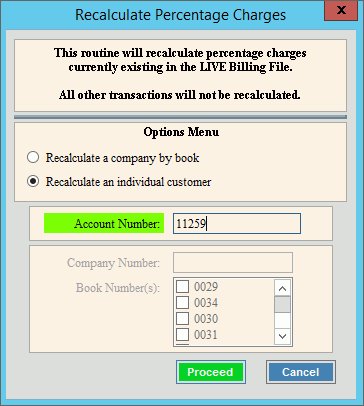
Percentage Recalculation Window Example:
Percentage Recalculation Prompts |
|
Options |
Select one of the following:
|
Account Number Book Numbers |
If you selected to recalculate an individual customer, enter the desired account number. Or, if you selected to recalculate a whole book, select the book or books from the book list. |
|
To run the routine and generate the report, click Proceed, or press [ENTER]. Keyboard shortcut: [ALT + p] Or, to escape from the routine, click
Cancel |


 .
.