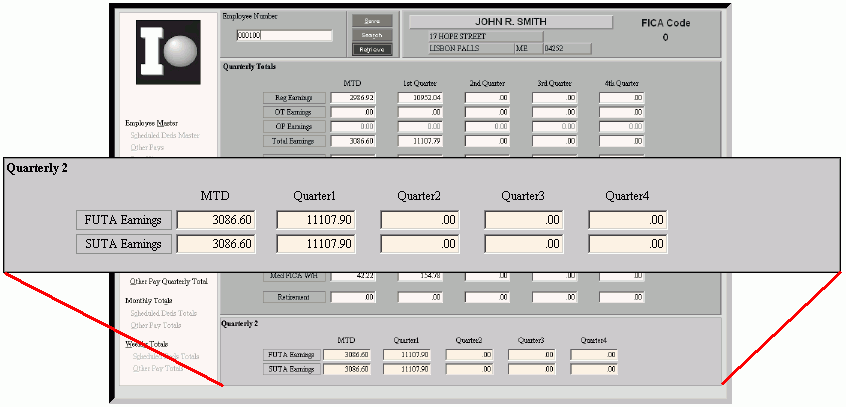
Employee Quarterly Totals Maintenance - Employee Quarterly2 Area
Use the Employee Quarterly2 Totals Area in Employee Quarterly Totals Maintenance to view the totals for unemployment earnings amounts for the current month and four quarters. The table following the window example describes the fields in this area.
Tips:
The system updates these fields, so you do not normally need to edit them.
The Period End Clear process clears these fields when you specify a calendar clear.
Directions:
To display the Employee Quarterly2 Area, which is located in the main window, open Employee Quarterly Totals Maintenance.
Employee Quarterly Totals Maintenance- Employee Quarterly2 Area Example:
|
Quarterly2 Totals Area Prompts Tip: To see more information about a field, click the hyperlink for the field name. Note: For each field listed below, the totals display for the current month, Quarter 1, Quarter 2, Quarter 3, and Quarter 4. |
|
|
Displays the FUTA (Federal Unemployment Tax Authority) Earnings Totals for the current month and four quarters. (6.2 numeric) | |
|
Displays the SUTA (State Unemployment Tax Authority) Earnings Totals for the current month and four quarters. (6.2 numeric) | |
|
|
To update the changed information, click Save, or press [ENTER]. Keyboard shortcut: [ALT + s] |
|
To avoid losing data, you must save the changed totals information. | |
|
|
To return to the main Employee Quarterly Totals Maintenance window, click Done. Keyboard shortcut: [ALT + d] |


 CAUTION