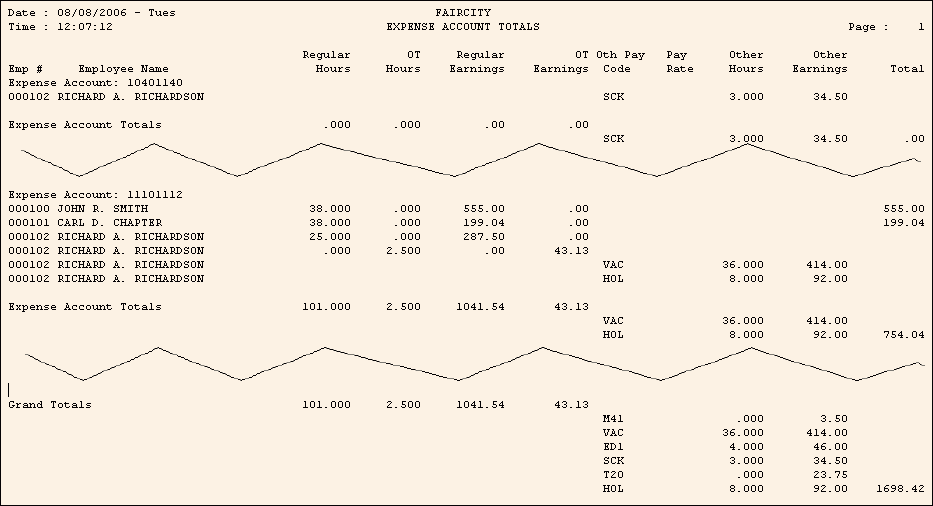
Check Register - Expense Account Totals Report Sample
The Expense Account Totals Report prints hours and earnings for each employee, totaled by Expense Account.
Tips:
To see instructions for running the report shown below, see the Payroll Check Edit Register Instructions, Payroll Check Register Instructions, and Permanent Payroll Check Edit Register Instructions.
This report is typically only used by municipalities.
The Expense Account Totals Report is similar to the Department Totals Register.
To see descriptions of the report fields, click More.
|
Expense Account Totals Report Fields Tip: To see more information about a field, click the hyperlink for the field name. | |
|
Expense Account Number for each Expense Account | |
|
Employee Number | |
|
Employee Name |
|
|
Regular Time | |
|
Overtime Time | |
|
Regular Pay Amount Paid | |
|
Overtime Amount Paid | |
|
Other Pay Code | |
|
Pay Rate |
Employee Salary Rate or Employee Hourly Rate Tip: The Pay Rate prints only for Other Pay Codes with the 7-Shift Differential Other Pay Type. |
|
Other Pay Time | |
|
Other Pay Amount Paid | |
|
Total |
Total for the employee within the Expense Account Tip: Total = Regular Earnings + Overtime Earnings + Other Pay Earnings |
|
Expense Account Totals |
Total hours and amounts for the Expense Account |
|
Grand Totals |
Total hours and amounts for the report |
|
Selection Parameters for this Report Sample: |
|
|
Run Code = 1 - TOWN EMPLOYEES |
Report Type = 1 - Long Register |
|
Dept From = Employee Master |
Print Additional Employee Codes = Yes |
|
Expense Account Totals: Yes |
Page Width = 132 Columns |

