 until
it displays in the Data Entry Panel.
until
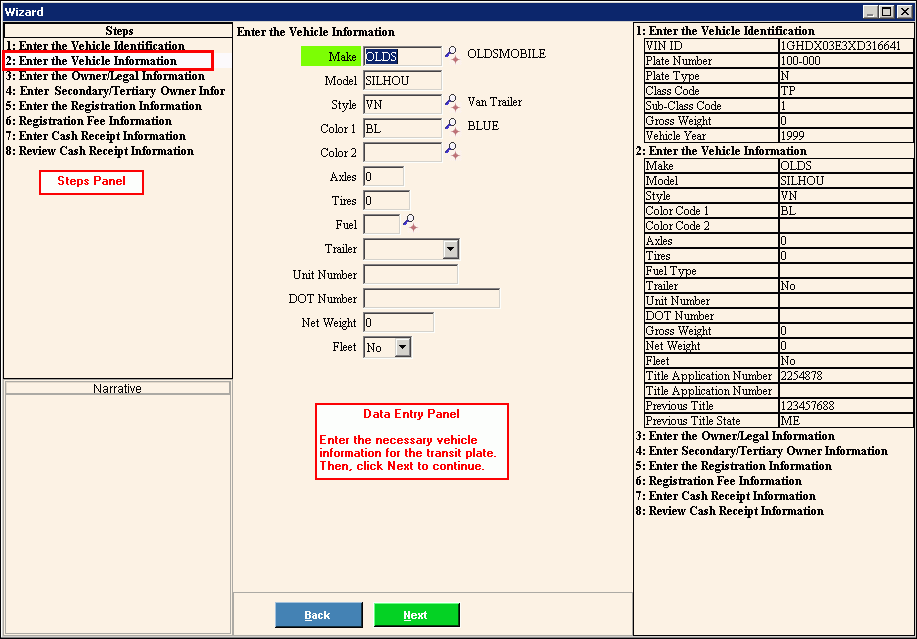
it displays in the Data Entry Panel.Transit Plate Registration Wizard - Enter Vehicle Information Step
Use the Enter Vehicle Information Step to enter the information about the make, model and other vehicle information pertaining to the vehicle for the temporary transit registration. The table following the panel example describes the data entry for this step in the Transit Plate Registration Wizard.
Tip: For general information about using wizards, see the Wizard - Introduction.
Directions:
To display the Enter Vehicle Information Step in the Data Entry Panel:
1. Open Transit Plate Registration Wizard.
2. To navigate
to the Enter Vehicle Information
step, click Next until
it displays in the Data Entry Panel.
Data Entry Panel - Enter Vehicle Information Step Example:
Data Entry Panel - Enter Vehicle Information Step Prompts Tip: To see more information about a field, click the hyperlink for that field name. |
|
Enter the defined vehicle manufacturer. (up to 4 characters) REQUIRED Notes:
|
|
Enter the defined model of vehicle being registered. Notes:
|
|
Enter a defined style of the vehicle being registered. REQUIRED Notes:
|
|
Color 1 |
Enter the defined color of the vehicle. (up to 2 characters) REQUIRED Notes:
|
Color 2 |
Enter the second color, if applicable. (up to 2 characters) Notes:
|
Enter the number of axles the vehicle has. Note: Axles are mandatory for Class Codes AC, AF, AP, BU, CC, CL, CO, FM, WE, TL, TT and for class code TR: SPECIAL MOBILE EQUIPMENT CLASS A. For all other Class Codes, leave Axles blank. |
|
Enter the number of wheels for the vehicle if you are registering a truck. (1.0 numeric) |
|
Enter the defined code for the type of fuel used by the vehicle. (1 character) REQUIRED Notes:
|
|
To specify the type of trailer, if applicable, click a choice in the drop-down list. |
|
Enter the number that identifies a specific vehicle. (4.0 numeric) Tip: The Unit Number is informational only and can be used to identify a specific vehicle in a fleet. |
|
Enter the Department Of Transportation Number for the vehicle, if applicable. (up to 9 characters) Note: The DOT Number is required for certain vehicles. For more information, see DOT Number. |
|
Enter the vehicle's net weight. (6.0 numeric) Note: The Net Weight is mandatory for Class Code SE. It is optional for all other class codes, but should not print on the registration form. |
|
To indicate the vehicle is part of a fleet, click Yes in the drop-down list. Otherwise, click No. Note: If you click Yes, you should maintain a unit number for the vehicle. |
|
|
To display the previous step, click Back. Keyboard shortcut: [ALT + b] |
|
To display the next step, click Next or press [ENTER]. Keyboard shortcut: [ALT + n] |
|
To close the wizard without validating or saving the data, click Close. |
 or press
  or
press
or
press 

