Click Enter Registration Fee in the Steps Panel.
Or,
click Next  or
click Back
or
click Back  until
the data that you want to maintain displays in the Data Entry Panel.
until
the data that you want to maintain displays in the Data Entry Panel.
Booster Permit Wizard - Enter Registration Fee Information Step
Use the Enter Registration Fee Information Step to maintain all the applicable fees for the booster permit for the vehicle. The table following the panel example describes the data entry for this step in the Booster Permit Wizard.
Tip: For general information about using wizards, see the Wizard - Introduction.
Directions:
To display the Enter Registration Fee Step in the Data Entry Panel:
1. Recall the registration in the Registration Inquiry.
2. Open the Booster Permit Wizard.
3. To navigate to the step that you want to maintain:
Click Enter Registration Fee in the Steps Panel.
Or,
click Next or
click Back until
the data that you want to maintain displays in the Data Entry Panel.
Data Entry Panel - Enter Registration Fee Step Example:
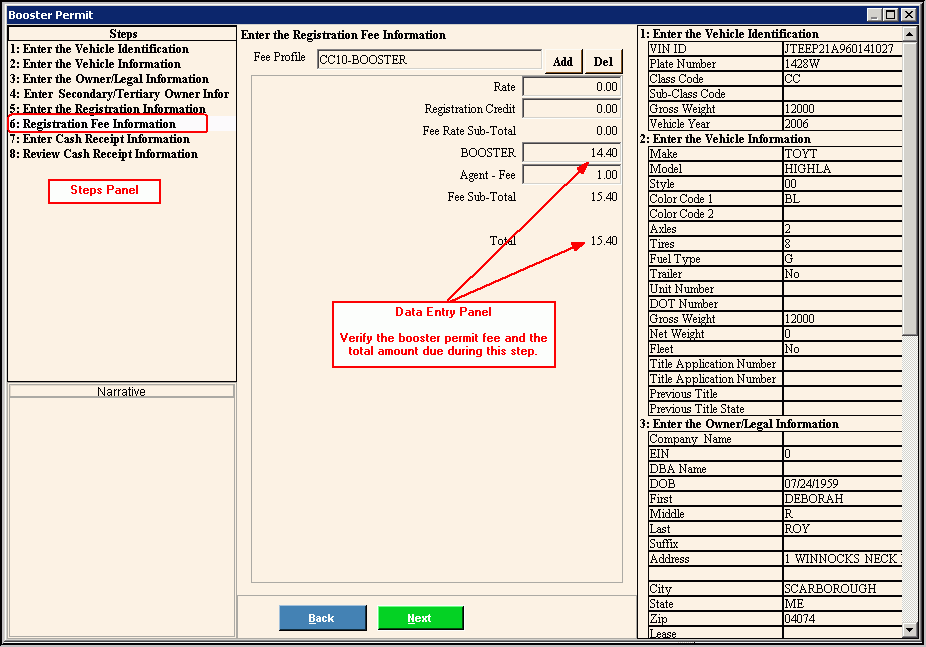
Data Entry Panel - Enter Registration Fee Step Prompts Tip: To see more information about a field, click the hyperlink for that field name. |
|
Displays the Fee Profile based on the Class Code and the booster permit you are entering. (up to 6 characters) |
|
|
To add an additional fee that is not currently listed, click Add Fee. Note: From the Fee Code Search window, click to select the appropriate fee to add. |
|
To remove a fee that was added, but should not be assessed for this transaction, click Delete Fee. |
To accept the default the registration rate from the Fee Profile, press [TAB] or enter another registration rate. (6.2 numeric) |
|
To accept the default registration credit amount for the state fees and rate credit, press [TAB]. Or, you can enter a credit amount. Tip: If you are paying with a gift certificate, enter the dollar amount of the gift certificate here. |
|
Displays for your reference the calculated dollar amount of the rate minus the registration credit amounts. Fee Rate Sub-total = registration rate - registration credits |
|
Displays for your reference the dollar amount to be charged for the booster permit. (7.2 numeric) Note: The Booster Permit Fee amount is mandatory for all booster permits. |
|
Displays for your reference the municipal agent handling fee to assess for the booster permit, if applicable. Note: The agent fee is only assessed if your municipality charges the agent fee. |
|
Displays for your reference the accumulated dollar sub-total amount. Fee Sub-total = booster fee + agent fee |
|
Displays for your reference the accumulated total dollar. Total = fee rate sub-total + fee sub-total |
|
|
To display the previous step, click Back. Keyboard shortcut: [ALT + b] |
|
To display the next step, click Next or press [ENTER]. Keyboard shortcut: [ALT + n] |
|
To close the wizard without validating or saving the data, click Close. |


