Change Out Radio MIU Wizard
Use the Change Out Radio MIU Wizard to change out the reading device for a meter, which is often called a radio head, MXU, or MIU. These items may need upgrading even when the device itself is still perfectly functional. A reason for the change out and a reference can be included to provide details as to why the change out was made. The battery install date and the radio MIU will be updated on the device and the connection. Multiple changeouts can be entered at the same time from this screen.
Tip: Radio MIU change outs can be seen in the Read History, in the change out history and in the Timeline view.
To open the Change Out Radio MIU Wizard, from the EDIFICE Inquiry, click
View and then Connections. Next click
Change Out and click
Change Out Radio MIU.
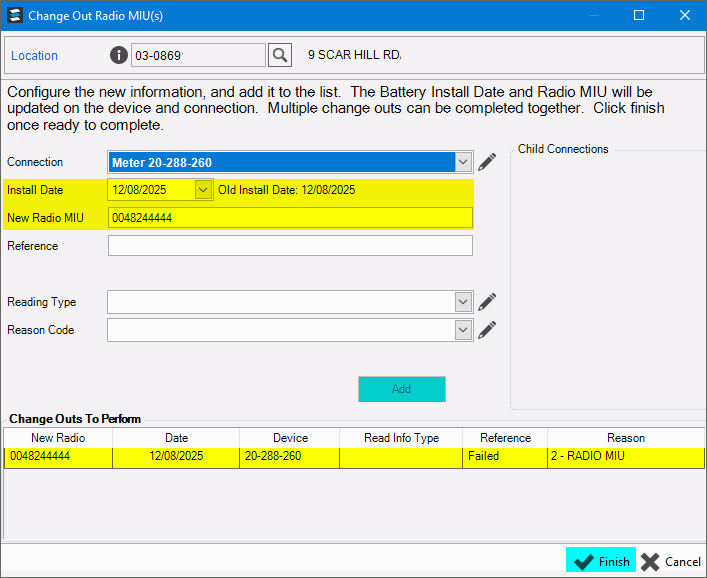
Change Out Radio MIU Wizard Window Example:
Change Out Radio MIU Prompts
|
|
The
location currently loaded in the Inquiry displays. Enter
another location if desired or click Search
|
|
Select from the drop-down list the ID for the meter, trailer, or component with the radio to be changed. |
|
Accept today's date as the install date for the new radio MIU or, enter the removal date. (mmddccyy) |
|
New Radio MIU |
Enter the new radio MIU number. |
Reference |
Enter a reference for the change out. |
Reading Type |
Select the type of reading for the old MIU, if applicable. You can add or edit the reading type by clicking the pencil. |
Select a reason code, if applicable. You can edit the reason code, if needed. |
|
|
To add the radio MIU to the connection, click Add. The radio MIU displays in the Change Outs to Perform list at the bottom of the screen. If there are MIUs that need to be changed, select the next radio MIU to change and repeat these steps until all MIUs are changed. |
|
To complete the change outs, click Finish. The window closes when the save is complete.
|
Viewing Radio MIU Change Outs
|
|


 IMPORTANT: To
avoid losing information, the wizard automatically saves your
data when you click Finish
IMPORTANT: To
avoid losing information, the wizard automatically saves your
data when you click Finish 
