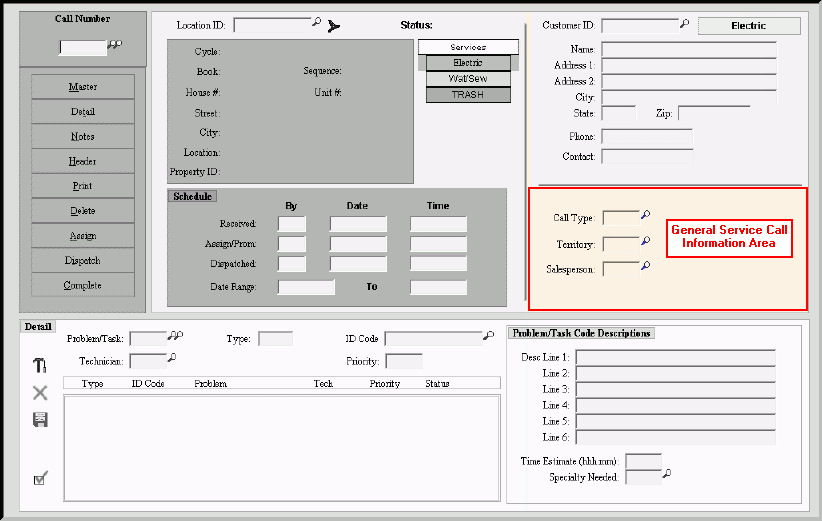
Service Call Entry - General Service Call Information Area
Use the General Service Call Information Area to maintain the type of service call, the general location of the service call and the salesperson who is assigned to the service call, if applicable. The table following the window example describes the General Service Call Information Area for Service Call Entry.
Tip: For more information about working with data in fields, see the Data Entry Guidelines.
To display the Service Call Entry - General Service Call Information Area:
1. Click Service Mgt from the Menu Bar.
2. Click Daily Work.
3. Click Service Call Entry.
Tip: Or, use the keyboard shortcut: [ALT] [m] [a] [e].
Service Call Entry - General Service Call Information Area Example:
|
Service Call Entry - General Service Call Information Area Prompts Tip: To see more information about a field, click the hyperlink for the field name. |
|
|
Enter the Type of Service Call this is. (up to 3 characters) Tips:
|
|
|
Enter the Territory where the service is needed. (up to 4 characters) Tips:
|
|
|
Enter the Salesperson assigned to the service call, if applicable. (up to 3 characters) Tips:
|
|

 or press