Opening the Connection Change Out Report Instructions, click More.
1. Click Reports from the Menu Bar.
2. Click Miscellaneous.
3. Click Connection Change Out Report.
Tip: Or, use the keyboard shortcut: [ALT] [e] [m] [m] [c] [c] [ENTER].
Connection Change Out Report Window Example:
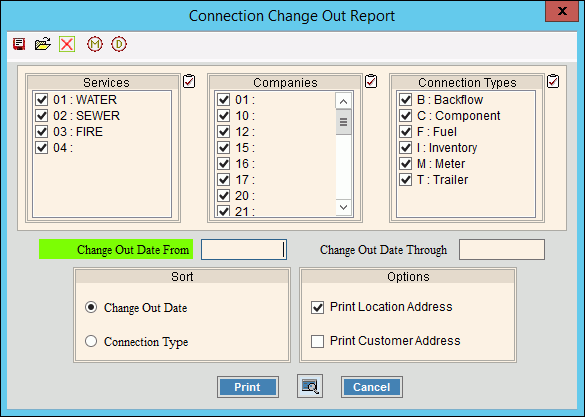
Choosing the Selections at the Prompt Window, click More.
|
Connection Change Out Report Prompts Tip: To see more information about a field, click the hyperlink for the field name. |
|
|
To select the Services to report, click to check the appropriate Services listed. Tip: To quickly select or de-select all Services listed, click Check All |
|
|
To select the Companies to report, click to check the appropriate Companies listed. Tip: To quickly select or de-select all Companies listed, click Check All |
|
|
To select the Connection Types to report, click to check the appropriate Connection Types listed. Tip: To quickly select or de-select all Connection Types listed, click Check All |
|
|
Change Out Date From |
To specify the starting date to look back in history for connection change outs, enter the appropriate change out date. (mmddccyy, slashes not necessary) Tip: To report all service connection change outs, leave blank. |
|
Change Out Date Through |
To specify the ending date to look back in history for connection change outs, enter the appropriate change out date. (mmddccyy, slashes not necessary) Tip: To report all service connection change outs, leave blank. |
|
Sort |
To specify the sort for the report, click a choice. |
|
Options |
Specify whether to include the location or customer address on the report, by checking the appropriate box:
|
|
|
To begin printing to the Windows® default printer, click Print, or press [ENTER]. Keyboard shortcut: [ALT + p] |
|
|
To run the routine and print to the Print View window, click here. |
|
|
To escape from the print routine, click Cancel. Keyboard shortcut: [ALT + c] |
|
Server Process Status |
|
|
Status |
Displays information pertaining to the various phases of the reporting process to guide you. Note: The status displays Complete when the process is ended. In addition, the Message window displays Time Started and Time Ended to alert you when the routine is complete. |
|
|
To close the window when the report is complete, click Close |
 .
.


Report Sample(s), click More.
To see an example of the report, click Connection Change Out Report Sample.
