Clear and Close Accounts

Use the Clear and Close Accounts routine during Year-End processing to clear revenue and expense accounts to the Clear To Accounts specified for retained earnings.  For each income and expense account, the routine zeros out the account by crediting or debiting the account for the amount of the account ending balance.  It offsets the credit or debit with a balancing transaction to the Clear To Account Number, which is the number of the retained earnings account.  The clearing journal entries are posted to period 14, the closing period.


IMPORTANT

Before running the Clear and Close routine...

  • Make sure the Save Historical Data routine has been completed.

  • Verify that each revenue and expense account has the correct Clear To Account identified.

    Tip:  Print the Chart of Accounts Report with the Print Clear To Account option selected, and sort the report by Type/Account.

After running the Clear and Close routine...

  • Review the report and contact NDS Support if you have any questions on the information.

  • Print the Year-End Journal Listing for the period that you specified in the Clear and Close (usually period 14).

  • Confirm the data on the journal before continuing onto the post.


Tips:


Directions:

To open click Year End from the menu.  Then click Clear and Close Accounts.

Tip
:  Or, use the keyboard shortcut:  [ALT] [y] [c].


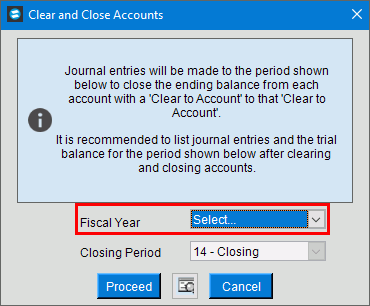
Clear and Close Accounts Window Example:

Clear and Close Accounts Prompt Options


Clear & Close Period

Displays the period for the journal entries that clear and close the income and expense accounts.

Warning:  The first step of the Clear and Close routine is to initialize (clear) period 14.  

Clearing Step Number

To limit the Clear and Close to a specific group of Account Numbers, enter the Step Number.  (2.0 numeric)

Tip:  Leave blank to specify all Steps.

To run the routine and begin printing, click Proceed or press [ENTER].

Keyboard shortcut:  [ALT + p]

To run the routine and print to the Print View screen, click Print View .

Or to escape from the routine, click Cancel .

Keyboard shortcut:  [ALT + c]

Or, click Close .


Other Year-End Topics